 Skip to content

Pakito/Shutterstock
The landscape of modern games is full of uninspired sequels, season passes, and microtransactions. Is it any wonder why many people love to play retro titles? Well, that and nostalgia. While many retro enthusiasts would rather emulate games, some prefer a more authentic experience with a retro console.
Consoles such as the Nintendo Entertainment System and Sega Genesis defined the 1980s, but time flies so quickly that even the Xbox 360 and PlayStation 3 are now considered retro. Many of these retro consoles were considered cutting-edge back in their day, and some still function in 2026. However, other retro consoles have earned a notorious reputation for rotting away before our eyes. For instance, the original Nintendo Game Boy’s screen clarity has degraded considerably because its dot-matrix screen breaks down over time. The rest of your old Game Boy is mostly reliable, but the same cannot be said for other retro gaming platforms, some of which are ticking time bombs unless you know how to repair them or send them to people who do. Heck, some of these consoles were powder kegs back when they were released.
Xbox 360
David Paul Morris/Getty Images
Many gamers argue that the Xbox 360 was the best console Microsoft ever produced. But early models were plagued by one of the most infamous console issues ever: the Red Ring of Death.
The Red Ring of Death occurred when launch model 360s either froze up or refused to boot, always followed by the front lights flashing red and forming a ring, hence its name. The cause can be traced back to the console’s development, which was rushed to get it on store shelves before the PlayStation 3. The connection to the GPU has an inherent flaw: repeated heating and cooling cycles stress the connection until it breaks. Subsequent models fixed the issue, but all release versions are unintentional powder kegs. As a result, you’re better off using a late-gen version to play Xbox 360-exclusive titles.
Ironically, early PlayStation 3 models (both the fat and slim) have a similar issue: when you try to turn the console on, the front light may flash yellow and then switch to red. This issue, known as the “Yellow Light of Death,” signals a general hardware failure. While not as widespread as the Red Ring of Death, the Yellow Light of Death is spreading among many PS3s as they age. The most likely culprit is the early models’ NEC/TOKIN capacitors, which have short lifespans. If true, most PS3s are living on borrowed time, so if you want to watch DVDs on the console, use a later model that relies on multi-layer ceramic capacitors instead.
Xbox
bigwa11/Shutterstock
The original Xbox was a flawed but important first step for Microsoft into the video game industry. A complete — but used — OG Xbox can fetch prices as high as $750 in today’s market, which is a lot of money to spend on a device that can destroy itself.
The key issue with original Xboxes is the clock capacitor. This component keeps the internal clock running after the console is unplugged. For five hours, anyway. However, most of these capacitors contain a dangerous design flaw: they are prone to leaking acid, which slowly eats away at the motherboard. If you own one of these consoles, it doesn’t matter whether it is plugged in or in storage; your Xbox is slowly but surely rotting away as you read this sentence.
If you are adamant about owning an OG Xbox and want to keep it in working condition, you have to open it up and replace the clock capacitor. The words “powerstor aerogel” are stamped on it, so it’s easy enough to locate. However, Microsoft stopped using these faulty components with the 1.6 revision — these are the only models that aren’t prone to capacitor leakage. If you find an Xbox in a thrift store, you can determine its version by flipping the console over and looking at the stickers on the bottom. If the date next to “MFG. DATE” is after “14/03/2004” and/or the serial numbers are listed as “LNNNNNN 41WFF” or “LNNNNNN 43WFF,” the console is safe. If not, either don’t buy it or replace the clock capacitor immediately after purchase.
Sega Dreamcast
audiznam260921/Shutterstock
The Sega Dreamcast was Sega’s last hurrah before the company abandoned hardware to focus on software. Many gamers considered the console ahead of its time, but the Dreamcast wasn’t a stranger to odd issues, such as a nasty malware infection found on some Dreamcast discs.
You can also brick the console just by using the controllers. The Sega Dreamcast has a unique flaw: plugging in, unplugging, or even just wiggling the controller cable can blow the fuse. If that happens, the Dreamcast will refuse to accept any controller inputs. Thankfully, this error can only occur when the Dreamcast is powered on, but it is still a huge oversight, since you could swap controller ports with every other console at the time. Heck, you can’t even damage Psycho Mantis in “Metal Gear Solid” unless you swap controller ports on the PlayStation. Imagine if Sony had ported the game to the Dreamcast, you tried the same tactic, and the console couldn’t recognize your controller anymore because you blew a fuse!
Unlike other consoles, the Dreamcast’s faulty fuse isn’t time-sensitive, so make sure the controller plug remains stable while in use if you play on original hardware. But given how intense some games can get (especially “Jet Set Radio” or “Crazy Taxi”), that’s easier said than done. You can replace the controller port fuse with a more stable alternative with some technical know-how, but if you are all thumbs, you might be better off purchasing modern ports of Dreamcast titles.
Atari Jaguar
Pakito/Shutterstock
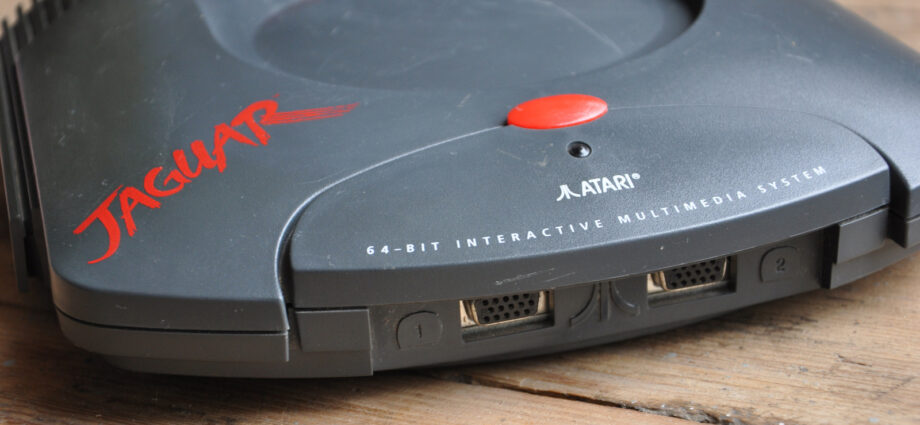
The Atari Jaguar was touted as the world’s first 64-bit console, but it failed due to a litany of problems, including a poor library of games. And if you thought reviews were unkind back in the day, time has been even worse.
Many of the Atari Jaguar’s issues can be traced to its cartridge bus. First off, the console doesn’t turn on without a game inserted. That is a design flaw in and of itself, and it only gets worse when you realize the console doesn’t include any flaps to deter dust buildup. Keeping the cartridge bus clean is a veritable exercise in futility, and once the connector goes, so does the console. And that’s just the base model.
To help keep the console alive, Atari released an add-on, the Atari Jaguar CD, that could play CD-based titles. However, this device was poorly designed and prone to malfunctions. Nobody knows for sure why, but the general consensus is that this add-on was shoddily built and couldn’t reliably connect to the base Atari Jaguar. In some cases, the Atari Jaguar CD refused to function even when directly hardwired into the base Atari Jaguar. If you are ever in the mood for playing a retro Atari console, you’re better off looking for the much rarer Atari Cosmos.
Sega Game Gear
Luza Studios/Getty Images
The Nintendo Game Boy dominated the handheld gaming market. Unlike prior handheld platforms, you could swap games, making the Game Boy the first portable cartridge-based device to hit store shelves. Sega tried to follow suit with its own handheld, the Sega Game Gear, but it couldn’t compete.
It also didn’t help that the Game Gear shipped with faulty components. As with the original Xbox, the main issue lies in the capacitors. The build quality of these components leaves a lot to be desired; combined with the age of Game Gears today, they are bound to fail eventually. Virtually every function of the Game Gear utilizes multiple of these faulty capacitors, and if they don’t fail outright, they leak. This means any Game Gears you have in storage are probably being eaten away from the inside out.
The screen is another common problem among Game Gears. This component is more advanced than the Game Boy’s because it displays colors and includes a backlight, but the backlight is also a huge power hog. Frequent use can also toast the display driver circuits, rendering the screen unusable. Good luck correctly diagnosing this, though. The aforementioned bad capacitors can also impact screen visibility. Even if your Game Gear works today, the console’s overreliance on capacitors makes repairing it an expensive hassle because the different problems often share the same symptoms.
